
Update 28.1.2632.790 Published August 7, 2026
Periodically, Sparkrock may publish updates between releases. This update replaces previously released updates. All updates are cumulative.
Highlights
To view the major accomplishments in this release, select the links:
New features and changes
Update 28.1.2632.790 for mySparkrock 2026 release wave 1 introduces the following new features and changes.
Prevent expense claim self-approval
This release adds a Prevent Self-Approval of Expense Claims checkbox to the Alternates page.
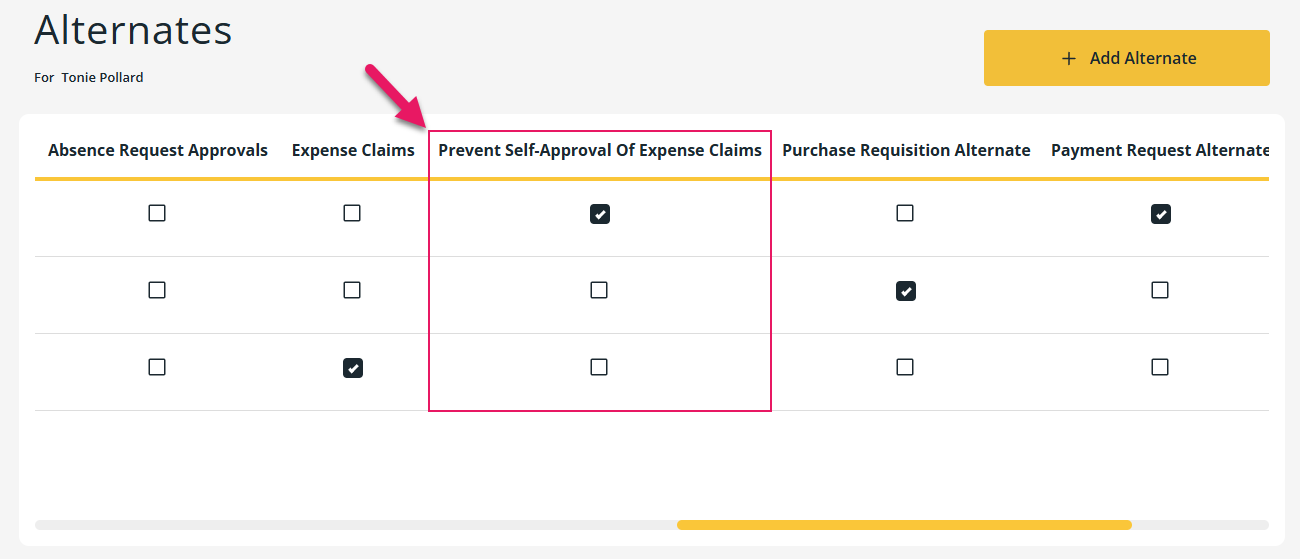
Finance administrators can select this checkbox on an expense approver's alternate record to prevent the alternate from approving expense claims that the alternate submitted.
The checkbox defaults to clear on new records.
To learn more about configuring this setting in Sparkrock Finance instead of mySparkrock, go to Prevent expense claims self-approval.
Learn more
- Alternates
MSR-2072, MSR-2073
Financial analysis drill-down links
Document numbers on the FA Commitment Details, FA Encumbrance Details, and FA Net Change Details drill-down pages are now displayed as hyperlinks for supported document types.
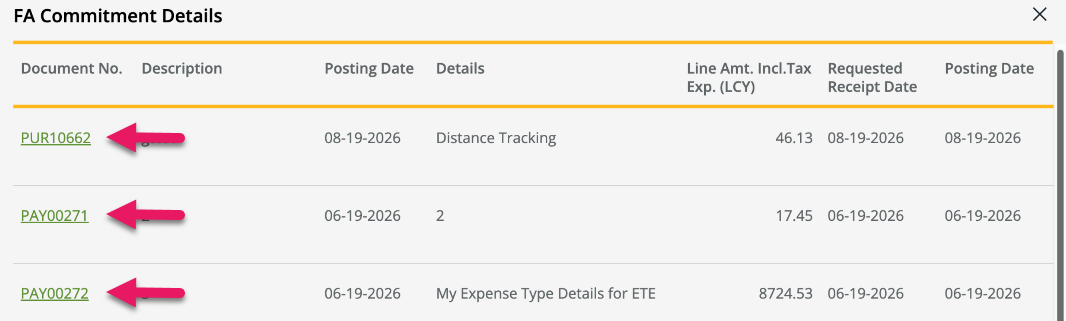
Selecting a hyperlink opens the source document in a new browser tab without affecting the state of the drill-down page.
The following document types are supported:
- Expense claims
- Payment requests
- Purchase invoices (posted and unposted)
- Purchase orders
- Purchase requisitions
Document numbers for all other document types continue to appear as plain text.
Learn more
- Perform a financial analysis
MSR-1703
Problems that are resolved in this update
The following problems are resolved in this update.
| Description | |
|---|---|
| On purchase requisitions and payment requests, the Tax Area Code defaults from the expense type instead of from the vendor when Default Vendor's Tax Area is turned on in Sparkrock Finance on the Purchases & Payables Setup page. |
|
| On purchase requisitions and payment requests, when you select the Purchaser Code dropdown list, mySparkrock does not display the list of configured purchasers. |
|
| On the Purchase Requisition page, when you select an expense type, mySparkrock clears the Unit of Measure value. |
|
| On the Purchase Invoices page, the Invoice No. column is truncated because the Batch column takes up the available space. As a result, vendor invoice numbers that exceed the column width are not fully visible. To resolve this problem, this release removes the Batch column to make space for the Invoice No. column. If extra space is required, the Invoice No. column now wraps to the next line. |
|
| On the Purchase Order page, the Amount (Excl. Tax) field on purchase order lines displays the remaining amount instead of the full line amount excluding tax. |
|
| On an expense claim, when an expense line includes dimension values that are not part of the account set, the dimension values are not visible to approvers. |
|
| On the Payment Requests, Purchase Requisitions, Purchase Invoices, and Purchase Orders and Receiving pages, when you enter a search term, mySparkrock ignores any active filters and displays results from all records instead of only the filtered records. |
|
| On the Finance Approvals page, mySparkrock incorrectly prevents an approver from accessing or approving a document that is pending approval even when the document has been routed to them for approval. This scenario occurs when the document would otherwise be restricted from view based on the Security filters setup on the mySparkrock User Setup Card page in Sparkrock Finance. To resolve this problem, mySparkrock now ignores the approver's Security filters setup when the document has been routed to them for approval. |
|
| After submitting a purchase requisition, payment request, or expense claim, mySparkrock does not display the complete list of approvers that are required to approve the document or the current approval status for each approver. As a result, requesters cannot see which approval levels are still pending. |
Related information
Feedback
To send feedback about this page, select the following link: