
Update 28.1.2634.827 Published August 21, 2026
Periodically, Sparkrock may publish updates between releases. This update replaces previously released updates. All updates are cumulative.
Highlights
To view the major accomplishments in this release, select the links:
New features and changes
Update 28.1.2634.827 for mySparkrock 2026 release wave 1 introduces the following new features and changes.
Attendance Approvals calendar displays full day names
On the Attendance Approvals page, the Team Calendar header now displays full day names (Sunday through Saturday) instead of abbreviated labels.
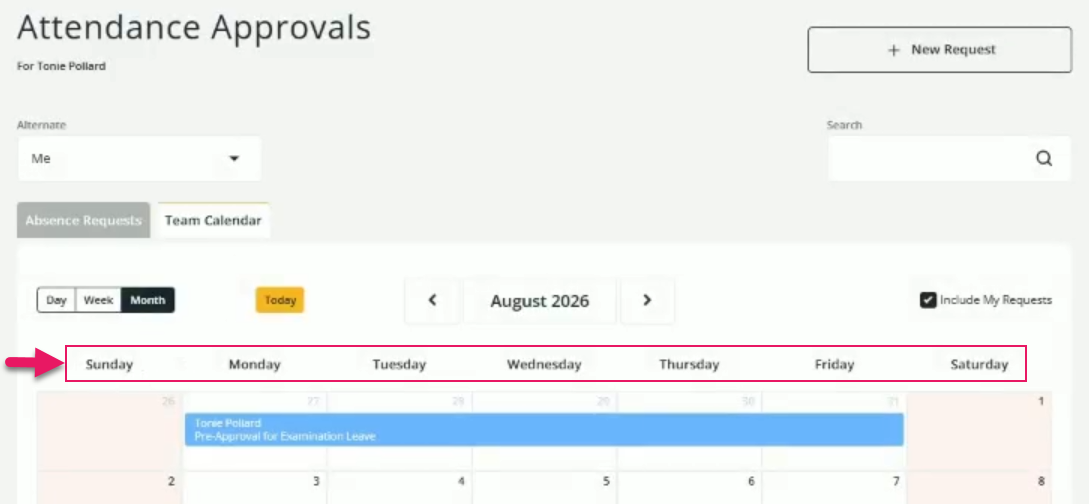
This change improves readability and accessibility for all users on both desktop and mobile.
Problems that are resolved in this update
The following problems are resolved in this update.
| Description | |
|---|---|
| When the Expenses and Claims menu option is not active, the Purchaser Code field dropdown list on the Purchase Requisition and Payment Request pages is empty. |
|
| On the Financial Analysis page, when you use the Advanced Filter, and then select Reset, mySparkrock removes all filters when displaying records, but does not clear the checkboxes for the previously selected options in dropdown lists. |
|
| On the Financial Approvals, Purchase Requisitions, and Payment Requests pages, the Alternate dropdown list may not display the expected list of alternate users. Also, on the Payment Requests page, when you select an alternate, mySparkrock does not correctly filter the list of requests to approve. |
|
| On the Approve Shifts Worked page, there is no indication that a shift has a requested absence. Also, when you select one of these shifts, mySparkrock displays an error and no shift details. To resolve these problems, the Approve Shifts Worked page now includes a Details column that displays Requested absence and when you select the shift you can now view the shift details. |
|
| When you select Receive on a purchase order, mySparkrock displays lines that have already been fully received. If every line on the purchase order is fully received, no message displays to indicate that there are no lines available to receive. To resolve this problem, mySparkrock now displays only lines that have an outstanding quantity, and displays a message when no lines are available to receive. |
|
| On the Purchase Invoices detail page, each line displays the total invoice amount instead of the line's own amount. To resolve this problem, mySparkrock now displays each line's own amount. As part of this fix, this release changes the field label from Amount (Incl. Tax) to Amount (Excl. Tax), because a per-line amount including tax is not currently available. |
|
| Dimensions may appear on expense claim, purchase requisition, and payment request pages even though the dimensions are configured to be hidden on finance requests in Sparkrock Finance. |
|
| On Purchase Requisition and Payment Request pages, the Budget tab displays the total budget amount instead of the total budget available. To resolve this problem, the Budget tab now displays the total budget available, and displays this amount in red when the amount is negative. |
Related information
Feedback
To send feedback about this page, select the following link: